Setting a winner is simply choosing the best variant that performed better.
This feature will automatically apply the product description and prices that you chose after or during the test to your Shopify product listing. We show all the collected data in an easy-to-digest manner and you're invited to pick your winner based on your own criteria. Selecting winners is a manual process.
You can Set a Winner on an ended test OR to an active running test.
You can follow the simple steps below to set a winner.
First. Click the Apps tab on your Shopify Menu.
Select Trident AB.
Second. Go to the right side of your screen and click the View results button.

You should now have the view of the 2 test variants and their tally on the bottom part. You should also have the option to select a winner on the right-hand side of your screen (Set the Winner).
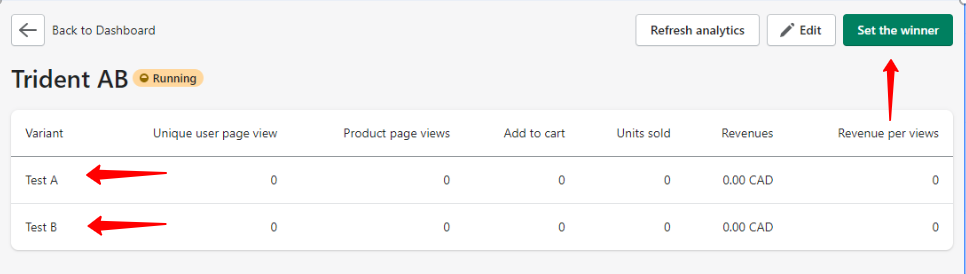
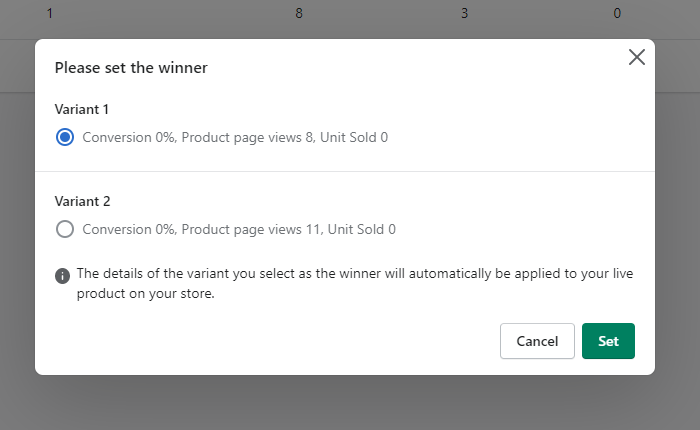
Third. When you click the Set the winner button, you will be shown the percentage, page views, unit sold summary of the 2 variants. It is now up to you to select which variant will be set on your website.
Finally. When you have made the decision, just click the green Set button on the bottom right of the screen.
Congrats! We have a Winner!
Note: We have a feature that allows you to automatically set the winning variant as your permanent listing. Our app edits your Product listing for you. See the steps above.
If you encounter an error while selecting a winner, please don't hesitate to contact us. Our live chat agents are always ready to assist.
Keywords:
How do I check the results of my test?
Can I end and select a winner immediately?